8 best blood test tracking apps in 2026: free and paid options compared
Start with the job you need done: organize existing lab reports, manage several profiles, use a professional workspace, or connect to a provider.
Verdict
Short answer: Consider Health3 for a lab-history workspace on iOS and Android; Guava for a broader health-record organizer with portal connections; Carrot Care for an iPhone tracker with a larger advertised marker library; Ornament for multiple profiles; and Soka for a browser workspace with patient organization. Apple Health and MyChart depend on connected providers. InsideTracker combines blood data with a paid recommendation membership. Compare the limits below before choosing.
At a glance
Swipe horizontally to compare all columns.
| Product | Choose it for | Free and paid access |
|---|---|---|
| Health3 | Lab history on iOS and Android | Free download; Premium scanning |
| Guava | Broader records, portal connections and lab history | Free record storage; automatic lab extraction in Premium |
| Carrot Care | iPhone tracking with a larger advertised marker library | Free download; paid features |
| Ornament | Multiple profiles and report uploads | Basic account; paid Plus features |
| Soka | Browser-based reports and patient organization | First test advertised free; paid subscription |
| Apple Health | Records already supplied by participating providers | Included with a compatible iPhone |
| MyChart | Provider records and communication | Access through a participating organization |
| InsideTracker | Blood-data recommendations and optional tests | $149/year international membership; tests extra (September 6) |
Compare the report-tracking options
These products accept existing reports. Features below are documented by the publishers; this is not an OCR accuracy test.
Swipe horizontally to compare all columns.
| Capability | Health3 | Guava | Carrot Care | Ornament | Soka |
|---|---|---|---|---|---|
| Platforms | iOS, Android | Web, iOS, Android | iPhone | iOS, Android | Web; native apps unverified |
| Existing reports | Supported PDF/photos and manual entry | Portal sync, PDF/photo uploads; automatic extraction in Premium | PDF/photo recognition | PDF/images, email and manual entry | Report upload and extraction |
| Results over time | Biomarker history and Test Reports | Record history and trends | History and trends | Lab-data visualization | Charts and test comparison |
| Export | Test/history/topic PDF; Test Report PNG | Printable visit summary | PDF with Plus | ||
| Sharing and profiles | Selected biomarkers; expiring, revocable access | Record sharing; unlimited profile managers in Premium | File export | Multiple profiles and shared test links | Patient organization and report export |
Inside the product
From an existing report to a history you can keep
See what the Health3 workflow involves before deciding whether it fits your reports. These are descriptions of our own product, not a comparison of extraction accuracy.
Bring a report you already have
Choose a supported PDF or photo, or enter supported results manually. Ongoing automated scanning requires Premium. See the import workflow and limits.
Review, then follow the history
Check extracted names, values, units and the test date against the original before saving. Use dated history to view recorded results over time. See how history is organized.
Take a copy with you
Export a test, history or topic as a PDF, or share a Test Report image. Keep the original laboratory document too. Compare the export options.
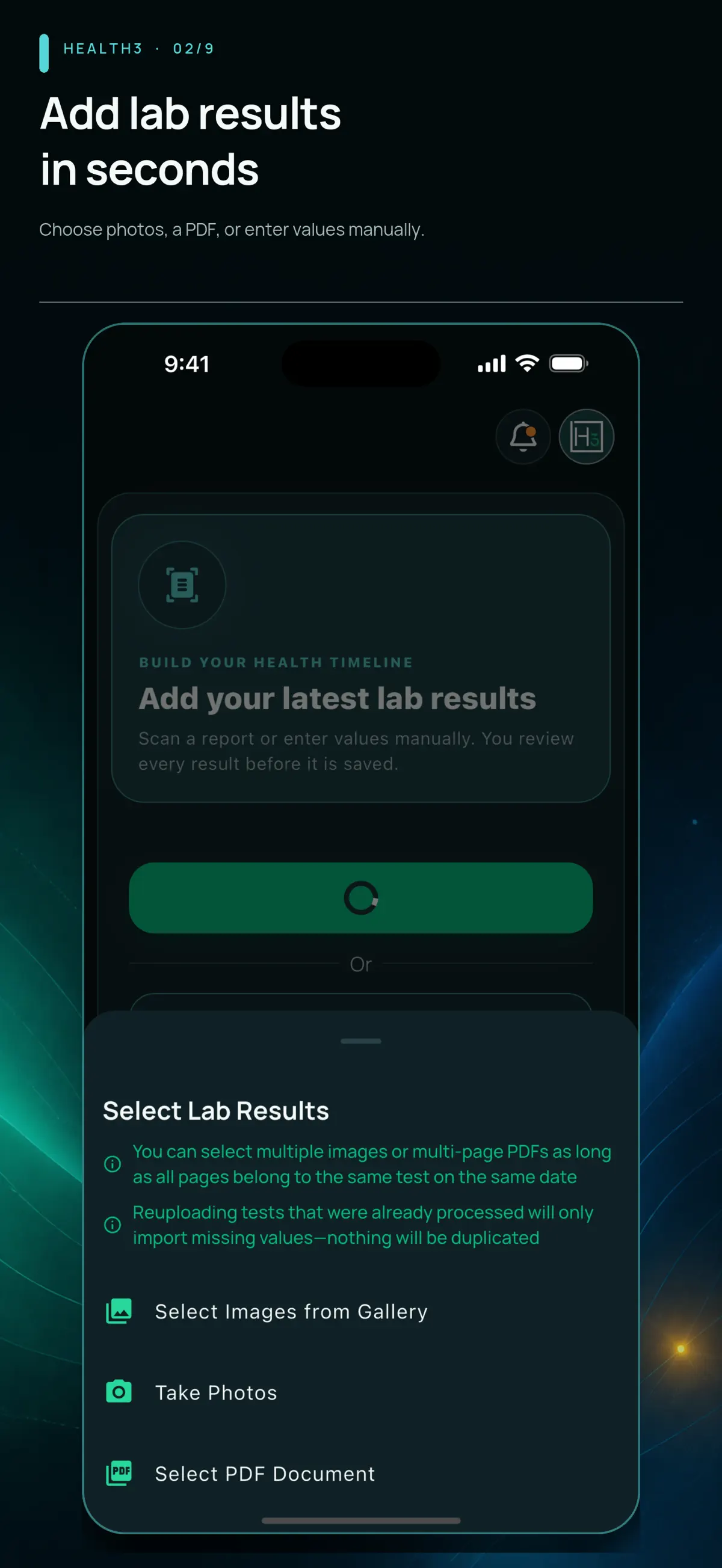
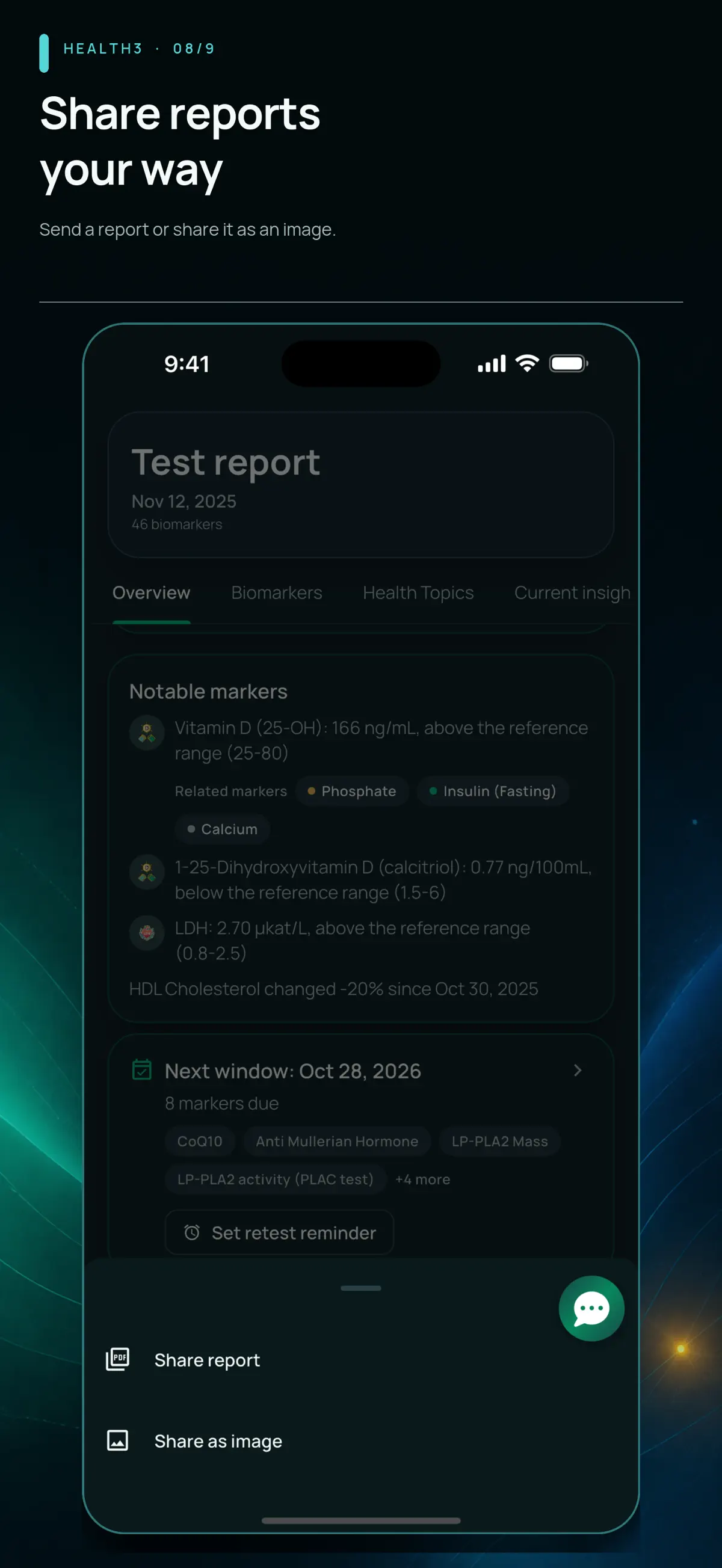
Artwork from the published September 5, 2026 screenshot archive. Screens show that version's interface; appearance and access can differ by installed version. Select an image to inspect the original.
What to check before choosing a tracker
Start with the supported-marker guide, your report's units and language, the export you need, and the data-handling policy. Health3 organizes information and does not diagnose or recommend treatment.
Compare the documented options · Get Health3 for iPhone or Android
How we compared the products
We compare documented inputs, platforms, data history, export, access and pricing. Health3 AG makes Health3 and publishes this guide. The order is a reading order, not a scored ranking. We have not run a head-to-head OCR accuracy test. Missing evidence is marked as unverified rather than treated as a missing feature.
Health3: review reports and keep a shared history across devices
Health3 is a blood test tracker for iOS and Android. Bring supported lab PDFs and report photos into one history, review extracted values, and follow your biomarkers over time. Add lifestyle journal entries, explore reference sources and biomarker relationships, and export reports. On iOS, you can also import supported Apple Health Clinical Records. Health3 provides educational context and does not diagnose or recommend treatment. Health3 is currently available on iOS and Android. The web app is temporarily unavailable. Ongoing automated report scanning requires Premium; onboarding access and offers are shown in the mobile app.
Health3 also includes a lifestyle journal, mobile reminder settings, reference-source browsing, and revocable access to selected biomarkers. Use the coverage guide and in-app library to check your markers. Export a PDF for detailed results or a Test Report image for a compact summary.
Guava: a broader health-record organizer
Guava combines lab history with other health records and connected patient portals. Its website documents PDF/photo uploads on web, iOS and Android, plus printable visit summaries. Its free plan stores and shares records; automatic detection and import of lab values is a Premium feature. The public plans page listed $8/month or $78/year on September 6, 2026. Check its supported-provider list for direct connections. Guava plans.
Carrot Care: an iPhone alternative
Carrot Care advertises a broader 1,000-plus-marker library. Its published features include favorites, reminders and dated milestones. Choose based on the markers and workflow you need; a larger catalog does not establish better recognition for a specific report. Its website currently says Android and web apps are not available.
Ornament: multiple profiles
Ornament documents multiple profiles in one account and several upload routes. Its help page limits documents to 30 MB and typed, structured results. Basic users can share links with other Ornament users; Plus adds PDF export. Cloud storage supports access on another device when enabled.
Soka: a browser workspace for reports and patients
Soka describes automated extraction, chart-based history, patient organization and PDF export. It also advertises an AI assistant. Its site offers a free first test; the public pricing route did not expose plan amounts during this review. Native iOS and Android apps were not verified.
Free access and published prices
US iOS in-app purchases listed on September 5, 2026: $9.99/week, $14.99/month, $99.99/year, or $149 lifetime. Prices and available offers vary by country, platform, and account.
Carrot Care’s US listing includes multiple offers, including $6.99 monthly and $59.99 yearly as of September 5; eligibility varies. Ornament distinguishes Basic and paid Plus features. Soka advertises a free first test; its public pricing page did not expose plan amounts during this review.
Privacy: distinguish storage from processing
Your Health3 account uses cloud storage and server processing for report imports. The privacy policy explains service providers, retention, analytics choices and account deletion. Health3 privacy policy.
Carrot Care describes local storage and optional iCloud backup, but its privacy policy also describes Google-server OCR and a separate manual-recognition service. Ornament documents account cloud storage. Guava describes cloud storage and user-controlled sharing in its privacy summary. Soka describes server-side storage and processing in its security summary. These are vendor disclosures, not independent security audits or a ranking of privacy.
When provider-connected tools fit better
Use MyChart for records and communication supplied by a participating care organization, or Apple Health when compatible records already arrive there. InsideTracker is relevant when you want its recommendation membership or optional tests. Function Health and other testing services serve a different purchase decision; see the related detailed comparisons.
Try a representative report before committing
Check a report containing the markers, units and language you actually use. Review extraction, test dates, how missing markers are handled, and the export format. Keep the original report. This guide does not recommend tests or interpret personal results.
Frequently asked questions
What are alternatives to Ornament and Carrot Care?
Health3 offers an iOS and Android workspace for supported lab results. Soka offers a browser-based report and patient workspace. Compare platforms, marker support, free scanning limits, exports and data handling before choosing.
Which app supports results from different labs?
Health3, Guava, Carrot Care, Ornament and Soka describe workflows for uploaded existing reports. InsideTracker also accepts outside blood results through its membership. Report compatibility still needs checking.
Is there a free blood test tracker?
Health3 is free to download on iOS and Android, with ongoing automated scanning in Premium. Its web app is temporarily unavailable. Guava offers free record storage, with automatic lab extraction in Premium. Carrot Care is free to download with paid features. Ornament has Basic and Plus features. Soka advertises a free first test.
Does Health3 have reminders and a lifestyle journal?
Yes. Health3 has a lifestyle journal and mobile reminder settings, alongside lab history and report export. Those features are not exclusive to another tracker.
Can these apps diagnose a condition?
Health3 does not diagnose or recommend treatment. A tracking app does not replace the original provider record or a qualified professional.
Primary sources and verification
- Health3 verified product features (September 5, 2026)
- Health3 US App Store listing and in-app prices
- Health3 Google Play listing and feature description
- Guava product and report uploads
- Guava current platform, free and Premium feature limits
- Guava privacy and storage disclosure
- Carrot Care product and platform FAQ
- Carrot Care US App Store features and purchase entries
- Carrot Care storage and OCR processing disclosure
- Ornament upload, profiles and export help
- Ornament current iOS product listing
- Soka product
- Soka pricing route (no public amounts returned in this review)
- Soka security self-assessment
- Apple Health Records
- MyChart help
- InsideTracker membership
- InsideTracker outside results
Related comparisons
Try Health3 with your existing report
Upload a supported lab report, review the extracted values, and decide what to save. Get Health3 for iPhone or Android. Ongoing automated scanning requires Premium.